FastAPI doesn't speak your users' language.
Here's how to fix that.

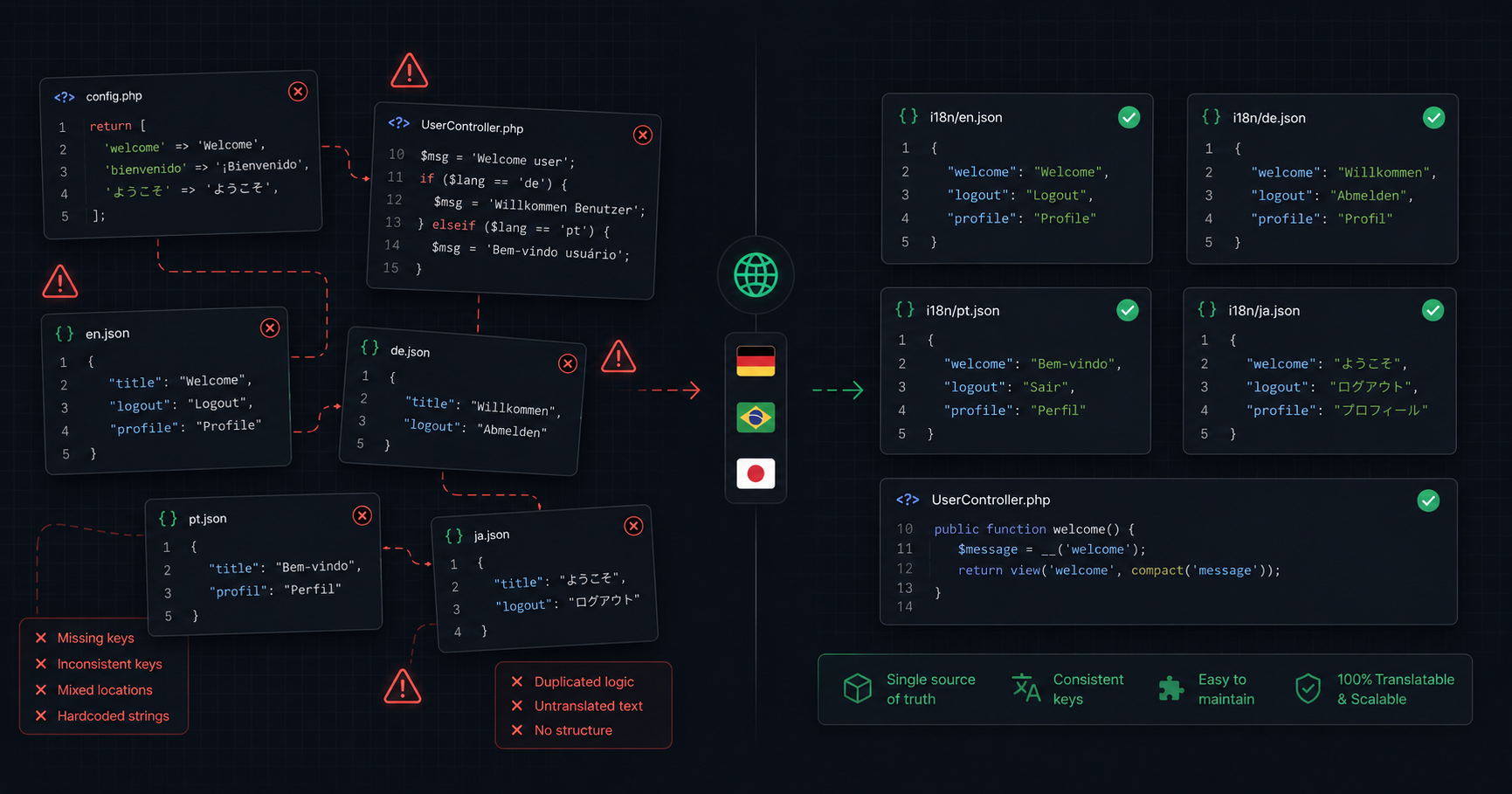
Most FastAPI tutorials end at "it works in English." But the moment you ship to users in Germany, Brazil, or Japan, you realize FastAPI has no built-in answer for internationalization — not in models, not in validation errors, not in API responses.
This post shows exactly how FastKit Core solves i18n end-to-end: translatable database fields, translated validation errors, and a standardized response format that frontend teams actually love working with.
The problem in concrete terms
Let's say you're building a product catalog for a multinational SaaS. You need article titles in English, German, and French. Here's what you'd normally do in FastAPI:
# The "usual" approach — store as JSON manually
class Article(Base):
    __tablename__ = "articles"
    id: Mapped[int] = mapped_column(primary_key=True)
    title: Mapped[dict] = mapped_column(JSON)  # {"en": "...", "de": "...", "fr": "..."}

# Then manually handle locale everywhere
article = session.get(Article, 1)
locale = request.headers.get("Accept-Language", "en")[:2]
title = article.title.get(locale) or article.title.get("en")  # manual fallback
And then in every validation error response, you return Pydantic's default English-only messages. And then your frontend has to parse inconsistent JSON shapes across endpoints.
Three separate problems — all unsolved by FastAPI out of the box.
Solution 1: TranslatableMixin — i18n directly in your SQLAlchemy model
FastKit Core ships a TranslatableMixin that makes multi-language fields completely
transparent. You declare which fields are translatable, and from then on they behave like normal
strings — reading and writing the current locale automatically.
from sqlalchemy import JSON
from sqlalchemy.orm import Mapped, mapped_column
from fastkit_core.database import Base, BaseWithTimestamps, IntIdMixin, TranslatableMixin

class Article(Base, IntIdMixin, BaseWithTimestamps, TranslatableMixin):
    __translatable__ = ['title', 'content']
    __fallback_locale__ = 'en'

    title: Mapped[dict] = mapped_column(JSON)
    content: Mapped[dict] = mapped_column(JSON)
    author_id: Mapped[int]
That's the entire model. Now here's how you use it:
article = Article()

# Write English
article.title = "How to build scalable APIs"

# Switch to German and write
article.set_locale('de')
article.title = "Wie man skalierbare APIs entwickelt"

# Switch to French
article.set_locale('fr')
article.title = "Comment construire des APIs évolutives"

# Read back — always returns current locale
article.set_locale('en')
print(article.title)  # "How to build scalable APIs"

article.set_locale('de')
print(article.title)  # "Wie man skalierbare APIs entwickelt"

# Get all translations at once
print(article.get_translations('title'))
# {'en': 'How to build scalable APIs', 'de': 'Wie man skalierbare APIs entwickelt', 'fr': 'Comment construire des APIs évolutives'}
What's actually happening under the hood: the mixin overrides __getattribute__ and
__setattr__ to intercept reads and writes on translatable fields, storing them in a
{"locale": "value"} dict that gets serialized to a JSON column. SQLAlchemy event
listeners handle serialization before insert/update and deserialization after load.
The result is transparent — you write article.title = "Hello" and the mixin takes
care of the rest.
Locale from request — automatic with LocaleMiddleware
FastKit Core ships a ready-made LocaleMiddleware that you register once and forget.
Add it to your app and every request automatically sets the correct locale for both model reads
and translation lookups:
from fastapi import FastAPI
from fastkit_core.http import LocaleMiddleware

app = FastAPI()
app.add_middleware(LocaleMiddleware)
That's it. No custom middleware to write, no set_locale() calls scattered through
your handlers.
The middleware resolves locale with the following priority:
Accept-Language request header (e.g. de, fr,
en)
?lang= query parameter (e.g. /articles?lang=de)locale cookieenThis means a German user whose browser sends Accept-Language: de gets German
responses automatically. A user who explicitly visits /articles?lang=fr gets
French. A returning user with a locale cookie set during login gets their saved
preference. All without touching a single route handler.
Fallback behavior
If a translation doesn't exist for the requested locale, it falls back to __fallback_locale__
automatically:
article.set_locale('es')  # Spanish not set
print(article.title)  # "How to build scalable APIs" — English fallback
Solution 2: Translated validation errors with _()
FastAPI + Pydantic gives you validation out of the box, but errors always come out in English, with Pydantic's internal message format. If you're serving a German user, they get:
{
  "detail": [
    {
      "loc": ["body", "email"],
      "msg": "value is not a valid email address",
      "type": "value_error.email"
    }
  ]
}
FastKit Core replaces this with a Laravel-style _() helper backed by JSON
translation files, and a BaseSchema that formats errors into a clean, consistent
structure.
Setting up translation files
translations/
├── en.json
├── de.json
└── fr.json
// translations/en.json
{
"validation": {
"required": "The {field} field is required.",
"string_too_short": "The {field} field must be at least {min_length} characters.",
"string_too_long": "The {field} field must not exceed {max_length} characters.",
"email": "The {field} field must be a valid email address.",
"value_error": "{field} is invalid."
},
"messages": {
"welcome": "Welcome, {name}!",
"article_created": "Article created successfully."
}
}// translations/de.json
{
"validation": {
"required": "Das Feld {field} ist erforderlich.",
"string_too_short": "Das Feld {field} muss mindestens {min_length} Zeichen lang sein.",
"string_too_long": "Das Feld {field} darf maximal {max_length} Zeichen haben.",
"email": "Das Feld {field} muss eine gültige E-Mail-Adresse sein.",
"value_error": "{field} ist ungültig."
},
"messages": {
"welcome": "Willkommen, {name}!",
"article_created": "Artikel erfolgreich erstellt."
}
}Using _() in your code
from fastkit_core.i18n import _, set_locale

set_locale('en')
print(_('messages.welcome', name='Maria'))
# "Welcome, Maria!"

set_locale('de')
print(_('messages.welcome', name='Maria'))
# "Willkommen, Maria!"
The locale context is shared between _() and TranslatableMixin —
setting it once via middleware affects both model reads and translation lookups.
BaseSchema — structured, translated validation errors
BaseSchema extends Pydantic's BaseModel with a
format_errors() classmethod that maps Pydantic's internal error types to your
translation keys and returns a clean dict:
from pydantic import EmailStr
from fastkit_core.validation import BaseSchema

class ArticleCreate(BaseSchema):
    title: str
    email: EmailStr
    content: str
When validation fails, instead of calling exc.errors() and getting Pydantic's raw
output, you call format_errors():
from pydantic import ValidationError
from fastkit_core.validation import BaseSchema
from fastkit_core.i18n import set_locale

set_locale('de')

try:
    ArticleCreate(title="", email="not-an-email", content="Hello")
except ValidationError as exc:
    errors = ArticleCreate.format_errors(exc)
    print(errors)
Output (in German):
{
  "email": ["Das Feld email muss eine gültige E-Mail-Adresse sein."],
  "title": ["Das Feld title ist erforderlich."]
}
Same code, different locale set in middleware → different language in errors. No if/else, no per-field translations.
Solution 3: Standardized response format
The third piece of the puzzle is consistent API responses. FastKit Core provides four response helpers that enforce the same JSON envelope across every endpoint:
from fastkit_core.http import success_response, error_response, paginated_responsesuccess_response
@router.get("/{id}")
async def show(id: int, service: ArticleService = Depends(get_service)):
    article = await service.get_or_404(id)
    return success_response(data=article)
{
"success": true,
"data": {
"id": 1,
"title": "How to build scalable APIs",
"content": "...",
"author_id": 42
}
}paginated_response
@router.get("")
async def index(page: int = 1, service: ArticleService = Depends(get_service)):
    items, meta = await service.paginate(page=page, per_page=20)
    return paginated_response(items=items, pagination=meta)
{
"success": true,
"data": [...],
"pagination": {
"page": 1,
"per_page": 20,
"total": 143,
"total_pages": 8,
"has_next": true,
"has_prev": false
}
}error_response — with translated validation errors
from fastkit_core.http import error_response
from fastkit_core.i18n import _

@router.post("")
async def store(data: ArticleCreate, service: ArticleService = Depends(get_service)):
    try:
        article = await service.create(data)
        return success_response(data=article, status_code=201)
    except ValidationError as exc:
        errors = ArticleCreate.format_errors(exc)
        return error_response(
            message=_('validation.failed'),
            errors=errors,
            status_code=422
        )
{
"success": false,
"message": "Validierung fehlgeschlagen.",
"errors": {
"title": ["Das Feld title ist erforderlich."],
"email": ["Das Feld email muss eine gültige E-Mail-Adresse sein."]
}
}The frontend team gets success: true/false to branch on, data always at
the same key, errors always as { field: [messages] }, and pagination
always in the same shape. No defensive parsing, no "what does this endpoint return?" questions.
Putting it all together — a full multilingual endpoint
First, register the middleware once in your main.py:
from fastapi import FastAPI
from fastkit_core.http import LocaleMiddleware

app = FastAPI()
app.add_middleware(LocaleMiddleware)
That's the entire setup. From this point, every request automatically carries the correct locale through your entire stack — models, translations, validation errors, and responses.
The router itself stays completely clean:
from fastapi import APIRouter, Depends
from fastkit_core.database import get_async_db
from fastkit_core.http import success_response, paginated_response
from sqlalchemy.ext.asyncio import AsyncSession
from .service import ArticleService
from .schemas import ArticleCreate, ArticleResponse

router = APIRouter(prefix='/articles', tags=['Articles'])

def get_service(session: AsyncSession = Depends(get_async_db)) -> ArticleService:
    return ArticleService(session)

@router.get("")
async def index(
    page: int = 1,
    service: ArticleService = Depends(get_service)
):
    items, meta = await service.paginate(page=page, per_page=20)
    return paginated_response(items=items, pagination=meta)

@router.get("/{id}")
async def show(id: int, service: ArticleService = Depends(get_service)):
    article = await service.get_or_404(id)
    return success_response(data=article)

@router.post("", status_code=201)
async def store(data: ArticleCreate, service: ArticleService = Depends(get_service)):
    article = await service.create(data)
    return success_response(data=article, status_code=201)
A German user hitting GET /articles with Accept-Language: de gets
article titles in German. An English user gets them in English. Validation errors come back in
the right language automatically. The response shape is identical either way.
Why this matters beyond convenience
In a multinational SaaS, i18n is not a feature you add later — it's infrastructure. Retrofitting it after the fact means touching every model, every validation schema, every response, and every frontend integration.
FastKit Core makes it a day-one decision with almost no ceremony:
The patterns were built from real production experience migrating Laravel applications to FastAPI — where Laravel's i18n and response conventions were things we sorely missed.
Getting started
pip install fastkit-coreIf this solved a problem you've been working around, a ⭐ on GitHub goes a long way for a small open-source project.